Using Zend_Captcha with forms and config
If you've been watching my presentations about Zend_Form on SlideShare, here's a little update after Zend Framework 1.6 release last Tuesday.
You start off with a simple contact form in XML. More information about creating this config can be found on my slides about Zend_Form.
To enable the Zend_Captcha feature within your form, you just add a captcha configuration right before your submit button.
The result is then a nice form with a captcha element.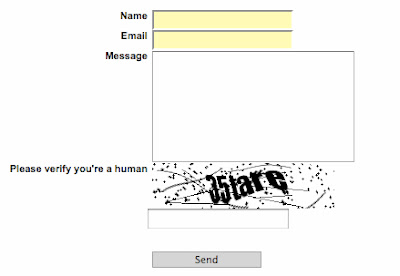
Validation is done through the form validator, so all you need to check is: $form->isValid($_POST);
So, now fight off those unwanted messages in your database or mailbox and use the power of Zend_Form and Zend_Config_Xml for your ease of use and maintainability.
You start off with a simple contact form in XML. More information about creating this config can be found on my slides about Zend_Form.
<?xml version="1.0" encoding="UTF-8"?>
<forms>
<development>
<contact>
    <action>/is/here</action>
    <method>post</method>
    <name>contactForm</name>
    <elements>
        <name>
            <type>text</type>
            <options>
                <label>Name</label>
                <required>true</required>
            </options>
        </name>
        <email>
            <type>text</type>
            <options>
                <label>Email</label>
                <required>true</required>
                <validators>
                    <emailAddress>
                        <validator>EmailAddress</validator>
                    </emailAddress>
                </validators>
            </options>
        </email>
        <message>
            <type>textarea</type>
            <options>
                <label>Message</label>
                <required>true</required>
            </options>
        </message>
        <submit>
            <type>submit</type>
            <options>
                <label>Send</label>
                <class>button</class>
            </options>
        </submit>
    </elements>
</contact>
</development>
</forms>
To enable the Zend_Captcha feature within your form, you just add a captcha configuration right before your submit button.
<captcha>
<type>captcha</type>
<options>
<label>Please verify you're a human</label>
<captcha>
    <captcha>Image</captcha>
    <wordLen>6</wordLen>
    <timeout>300</timeout>
    <font>../app/data/impact.ttf</font>
</captcha>
</options>
</captcha>
The result is then a nice form with a captcha element.

Validation is done through the form validator, so all you need to check is: $form->isValid($_POST);
So, now fight off those unwanted messages in your database or mailbox and use the power of Zend_Form and Zend_Config_Xml for your ease of use and maintainability.


Thanks for the slides, saw them last week and they were a great jumpstart; found this post today while trying to solve a Zend captcha validation problem. While you're post helped confirm my config/captcha code, it also lead me to why my validation was failing. It was totally my fault, but wanted to share my issue with others.
ReplyDeleteEverytime I called form->isValid($request), I'd fail with empty value for the captcha. Well, when using the Zend default render, the Captcha_Image element inputs have different attributes for 'id' and 'name'. ex: <input type="hidden" name="captcha[id]" value="a1714929730288e265d3718a926d131f" helper="formText" id="captcha-id">
<input type="text" name="captcha[input]" id="captcha-input" value="" helper="formText">
On my form, data is sent via javascript function, which took for granted that Zend renders most form elements with identical id/name attributes. Silly me. This is a case where the 'id' and 'name' attributes are different. So, if you are using some ajaxian submit, make sure you're using the 'name' attribute!
Best Regards -David
I am actually trying to use an INI config not XML.
ReplyDeleteuser.signup.elements.captchaImage.type = "captcha"
user.signup.elements.captchaImage.label = "Are you human?"
user.signup.elements.captchaImage.options.captcha = "Figlet"
As of 1.6 first stable release, the above works, but below does not
user.signup.elements.captchaImage.options.wordlen = "6"
user.signup.elements.captchaImage.options.timeout = "300"
Thanks a lot for this information. I've been trying to create my blog recently and faced some difficulties. I found some books and articles on the topic at the search engine http://rapid4me.com . My friends' advice was of great help as well. But here you paid attention to very important details. And you wrote it in a simple way. Much appreciated. Thank you.
ReplyDeleteI was looking for crucial information on this subject. The information was important as I am about to launch my own portal. Thanks for providing a missing link in my business.
ReplyDelete